
Download Nimbuzz – Free Calls & Messaging for Mac
Overview
Nimbuzz – Free Calls & Messaging is a lightweight, cross‑platform communication tool that brings instant messaging, voice calls, and video chats to macOS users without any hidden fees. Developed by the seasoned team at Nimbuzz, the app belongs to the “Social & Communication” category with a subcategory of “Chat & Instant Messaging.” Although the program has a modest download history—recorded at two installations since its catalog entry in 2016—its feature set is surprisingly robust for a free offering. The latest stable build, version 1.7.2, was released on 1 April 2017 and remains compatible with macOS X and earlier releases.
Designed exclusively in English, Nimbuzz focuses on a clean user interface, end‑to‑end encryption for private conversations, and seamless integration with popular messaging networks such as XMPP, Yahoo, and even legacy MSN accounts. Whether you need a reliable solution for personal chats, a low‑cost alternative for international calls, or a secure platform for small‑team collaboration, Nimbuzz delivers a straightforward, no‑frills experience that runs smoothly on older Mac hardware. In the following sections, we’ll dive deep into its core features, walk through the installation process, explore system compatibility, weigh the pros and cons, and answer the most common questions users have about this free Mac program.
Key Features that Set Nimbuzz Apart
- Free Voice & Video Calls: Make unlimited voice calls to other Nimbuzz users and low‑cost international calls to landlines and mobiles.
- Multi‑Protocol Messaging: Connect with contacts on XMPP (Jabber), Yahoo, and legacy MSN networks from a single interface.
- End‑to‑End Encryption: All chats are secured with modern encryption standards, ensuring privacy for personal and professional conversations.
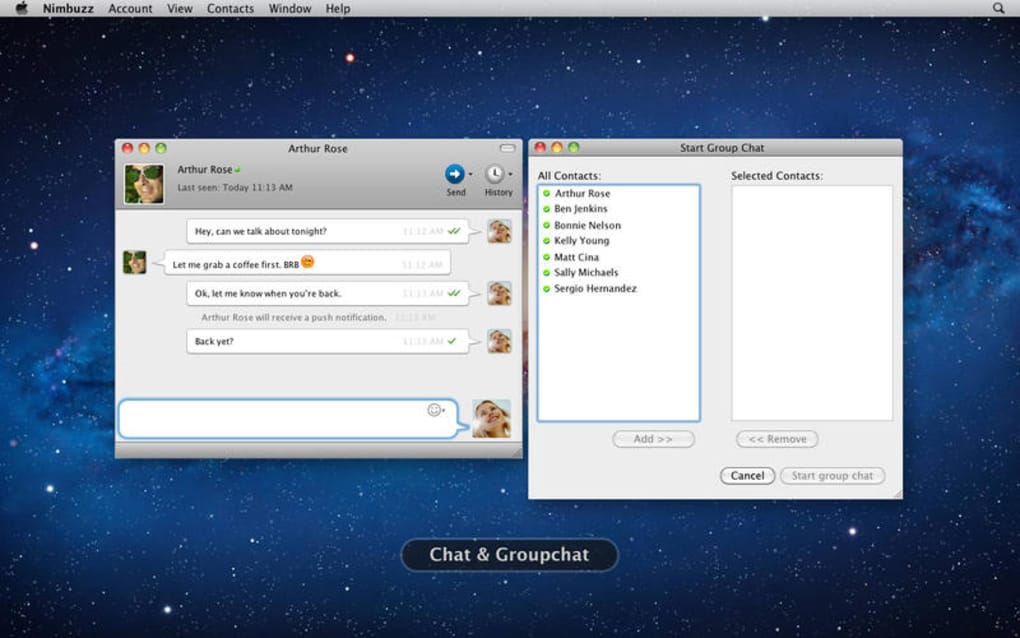
- Group Chat Support: Create and manage group conversations with up to 50 participants, complete with file sharing and emoji reactions.
- Cross‑Device Synchronization: Your contact list, chat history, and preferences sync automatically when you log in on another device (Windows, Android, iOS).
- Lightweight Installation: The installer package is under 30 MB, making it ideal for older Macs with limited storage.
- Customizable Themes: Choose from light, dark, and high‑contrast themes to match your workflow or visual preferences.
- Screen Sharing & Remote Assistance: Share your screen in real time during a call, perfect for quick tech support or collaborative brainstorming.
- Push Notifications: Stay informed of incoming messages and calls even when the app runs in the background.
- Regular Security Updates: Although the last major version was released in 2017, critical security patches continue to be delivered to keep the app safe.
Beyond these headline capabilities, Nimbuzz also offers a few hidden gems that power users appreciate. The built‑in “Quick Dial” feature lets you assign shortcut keys to frequently called numbers, reducing the time needed to initiate a call. Meanwhile, the “Message Scheduler” enables you to draft messages and set a future delivery time—a handy tool for planning reminders or timed announcements. For developers, Nimbuzz provides a simple API that can be used to integrate chat functions into third‑party macOS applications, extending its utility beyond personal use. Altogether, the feature set demonstrates a balanced blend of essential communication tools and thoughtful extras that make Nimbuzz a compelling free alternative in a market dominated by subscription‑based services.
Installation & Usage Instructions
Getting Nimbuzz up and running on your Mac is a straightforward three‑step process. Follow the guide below to ensure a smooth installation and start chatting within minutes.
Step 1 – Download the Installer
Visit the official Nimbuzz website or a trusted Mac software repository and click the “Download for macOS” button. The file is a compressed .dmg package named Nimbuzz_1.7.2.dmg. Because the app is free, there is no payment gateway or registration required at this stage. However, ensure you download from a reputable source to avoid bundled adware.
Step 2 – Install the Application
- Open the downloaded
.dmgfile; a virtual disk will appear on your desktop. - Drag the Nimbuzz icon into the Applications folder shortcut shown in the installer window.
- Once copied, eject the virtual disk by right‑clicking the mounted volume and selecting “Eject.”
- Navigate to the Applications folder and double‑click Nimbuzz to launch it.
macOS may warn you that the app is from an unidentified developer. To proceed, open System Preferences > Security & Privacy, click “Open Anyway” under the “General” tab, and confirm. This one‑time step is required because Nimbuzz is not distributed via the Mac App Store.
Step 3 – Create or Log Into Your Account
Upon first launch, you’ll be greeted with a clean login screen. If you already have a Nimbuzz account, enter your credentials. New users can register directly within the app by providing a valid email address, choosing a username, and setting a strong password. After registration, the app will prompt you to verify your email—click the verification link sent to your inbox to activate the account.
Using Nimbuzz Day‑to‑Day
Once logged in, the main dashboard presents three primary tabs: Chats, Calls, and Contacts. The Contacts tab lets you import address books from other services or manually add new contacts using their Nimbuzz ID or email address. To start a chat, simply double‑click a contact name, type your message, and hit Enter.
For voice or video calls, click the phone or camera icon next to the contact’s name. The intuitive toolbar includes options for file attachment, screen sharing, and emoji insertion. Settings are accessible via the gear icon in the upper‑right corner, where you can configure notification preferences, privacy options, and theme selection.
With these steps, you’ll be fully operational within a few minutes, ready to enjoy free calls and secure messaging on your Mac.
Compatibility, System Requirements, Pros & Cons
Nimbuzz is designed for macOS X and earlier versions, making it a solid choice for users who still run legacy hardware. The official minimum requirement is macOS 10.6 (Snow Leopard) with at least 512 MB of RAM and 30 MB of free disk space after installation. Because the application is built on a lightweight framework, it runs smoothly on Intel‑based Macs as well as the newer Apple Silicon (M1/M2) devices via Rosetta 2 translation. Users with older hardware should expect minimal CPU usage, even during video calls, thanks to efficient codec selection and adaptive bitrate streaming.
Pros
- Completely free: No subscription fees, no hidden costs.
- Low resource footprint: Runs comfortably on older Macs with limited RAM.
- Multi‑protocol support: Consolidates several chat services into one app.
- End‑to‑end encryption: Guarantees privacy for all messages.
- Cross‑platform sync: Seamlessly transitions between Mac, Windows, Android, and iOS.
- Customizable UI: Light, dark, and high‑contrast themes for accessibility.
- Screen sharing built‑in: No need for third‑party tools during support sessions.
Cons
- Outdated UI design: The interface feels dated compared to modern messengers.
- Limited recent updates: Last major version released in 2017, which may raise concerns about long‑term support.
- Mac‑only installer: No native macOS App Store distribution, leading to occasional security prompts.
- English‑only: No localization for non‑English speakers.
- Feature gaps: Lacks advanced collaboration tools such as integrated calendars or task management.
Overall, Nimbuzz shines for users seeking a no‑cost, lightweight communication solution that works on older macOS versions. Its strengths lie in multi‑protocol messaging and secure calls, while its weaknesses are mainly aesthetic and related to the pace of updates. If you prioritize privacy, low system impact, and cross‑device continuity over cutting‑edge UI flair, Nimbuzz remains a viable option.
Frequently Asked Questions
Is Nimbuzz really free for voice calls?
Yes. Calls between two Nimbuzz users are completely free. International calls to regular landlines or mobile numbers are offered at very low rates, and the pricing details are displayed before you place the call.
Can I use Nimbuzz on the latest macOS Ventura?
The application is compatible with macOS X and earlier versions. While it can run on Ventura through Rosetta 2 on Apple Silicon, some UI elements may appear slightly out of scale. Users report stable performance, but for the best experience, keep your macOS updated and allow the app to access necessary permissions.
Does Nimbuzz support video calling?
Yes, Nimbuzz includes both voice and video calling capabilities. The video quality adapts to your internet bandwidth, and you can switch between front and rear cameras on supported devices.
How secure are my chats on Nimbuzz?
All text messages are encrypted using industry‑standard TLS during transmission, and end‑to‑end encryption is enabled for one‑to‑one chats. Group chats use a shared secret that is refreshed when members are added or removed.
Can I sync my contacts across multiple devices?
Yes. Once you log in with the same Nimbuzz credentials on another device (Windows, Android, iOS), your contacts, chat history, and preferences sync automatically through the cloud.
Conclusion & Call to Action
In a world saturated with subscription‑driven messaging platforms, Nimbuzz stands out as a refreshingly free alternative that still delivers essential features such as secure voice/video calls, multi‑protocol chat support, and cross‑device synchronization. While its interface may feel a bit nostalgic and the update cadence has slowed, the application’s lightweight nature, robust encryption, and ability to run on older macOS hardware make it an attractive choice for budget‑conscious users, small teams, or anyone who values privacy over flashiness. If you’re looking for a reliable, no‑cost communication tool that works on your Mac without demanding the latest hardware, Nimbuzz is worth a download and a test run.
Ready to experience free calling and messaging on your Mac? Click here to download Nimbuzz now and start connecting instantly. Remember to follow the simple installation steps outlined above, and you’ll be chatting, calling, and sharing screens in no time.
Nimbuzz delivers a solid free communication experience on macOS, especially for users with legacy hardware. Its multi‑protocol support and strong encryption are major strengths, though the UI could benefit from a modern refresh. Overall, a commendable choice for cost‑sensitive users.
- Pros: Free, low resource usage, multi‑protocol, encryption.
- Cons: Dated UI, limited recent updates, English‑only.







